

Choosing the right screenwriting software can make a big difference in the overall quality and efficiency of your work. In this article, we take a look at Arc Studio Pro and Final Draft side-by-side. Both are excellent tools that can help a screenwriter write faster and more efficiently, but which one is right for you?
When it comes to screenwriting software, Final Draft is one of the oldest and is often seen as the default choice of screenwriters. So, how does Arc Studio Pro compare with Final Draft? Let's have a look.
Script Formatting
The most important factor for any screenwriting software is whether or not it can produce a properly formatted screenplay. Both Arc Studio Pro and Final Draft are up to the task, offering many options for formatting screenplays according to industry standards.
Arc Studio Pro
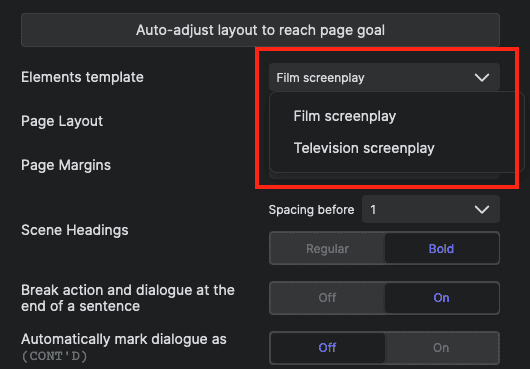
Arc Studio Pro has built-in industry-standard templates for feature film screenplays and television. Additionally, it has the ability to customize the formatting, which can be handy for screenwriters who need to tweak the default settings.
Final Draft
Final Draft offers a wide variety of templates for everything from alternative screenplay formats (for example, BBC and Warner Brothers) to TV to Broadway musicals and even podcasts. If those templates aren't what you are looking for, you can customize any elements to your liking.
Winner: Tie
Compatibility and Import / Export
Both Arc Studio Pro and Final Draft are able to import and export scripts in the Final Draft (FDX) file format. This means that if you have used Final Draft in the past, you can easily open and continue working on any of your projects in Arc Studio Pro. Likewise, if you start a project in Arc Studio, you can finish it in Final Draft.
Additionally, Arc Studio offers the option to export in Fountain and PDF, while Final Draft offers PDF and a variety of text (.txt) options.
Winner: Arc Studio
Outlining / Planning
Both apps deliver tools to help you outline and organize your story structure. Each has its own unique take on this process, but in general terms, they are similar, and for each writer, it will be a question of taste.
Both offer the standard outline view, where you can view all of your scenes at a glance and drag and drop those scenes to rearrange them.
And they both offer a more free-form board outline that allows you to organize your ideas. Final Draft calls this the beat board, and Arc Studio calls it the plot board.
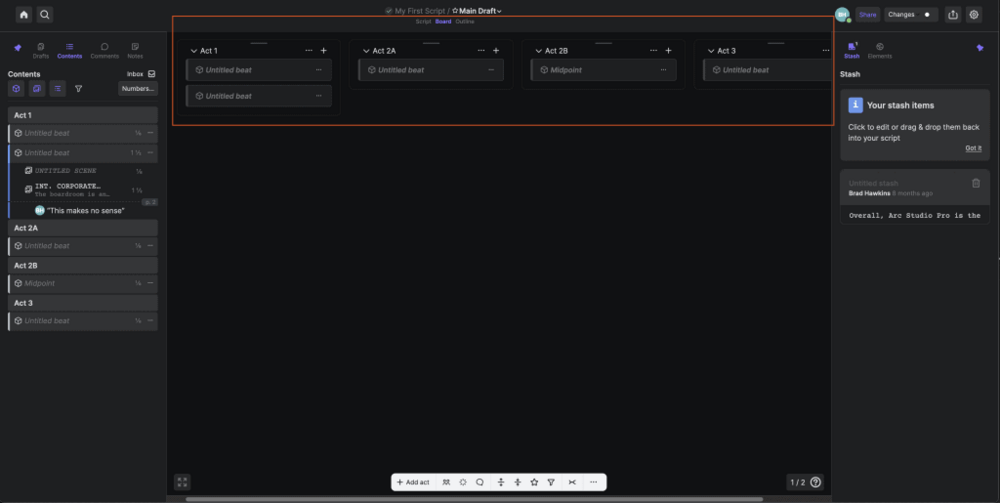
Final Draft's beat board is more free-form, starting with an empty space, while Arc Studio's plot board offers the ability to start with a blank board or to use one of several templates, including a standard three-act structure and Blake Snyder's Save the Cat structure.
Season Outlines
A unique feature of Arc Studio Pro is that it offers the ability to create season outlines for television (or web, YouTube, etc.). This can be a helpful tool for organizing long character arcs and plot lines that extend beyond a single script.
Winner: Arc Studio
Notes
Both apps offer a system to take and keep notes as you write. In Final Draft, they call this a ScriptNote, and in Arc Studio, it is called a Comment.
Regardless of the name, both apps function very similarly in this aspect.
Winner: Tie
Collaboration
In terms of collaboration, Arc Studio Pro's real-time collaboration feature sets it apart from Final Draft, which does not offer this feature.
However, Final Draft does offer the ability to write on separate pages of the same script at the same time, which can be helpful for writers working on a team.
Another important consideration is the cost. Final Draft collaboration requires that all participants have a valid license for Final Draft. Whereas with Arc Studio Pro, collaborators can do basic editing and commenting without a subscription.
Winner: Arc Studio
Backups
Both screenwriting apps offer the ability to have your screenplay backed up automatically, but Arc Studio offers a number of advantages over Final Draft.
- Cloud backups (in addition to local backups)
- Google Drive Option
- Automatic draft history (easily roll back changes)
Winner: Arc Studio
Production Tools
This is probably the one area where Final Draft truly outshines Arc Studio Pro. Final Draft offers a number of tools specifically for use when a project has been greenlit and is going into production.
To be honest, some of these tools, such as the tagging feature, aren't designed for or used by screenwriters; rather, these are tools that will be used by the UPM or AD when breaking down a script for budgeting and scheduling purposes. That said, they are important features for some.
Winner: Final Draft
Cross Platform Compatability
Both apps are available for desktop computers (Mac and Windows), and both have iOS apps (additional cost for Final Draft), but only Arc Studio Pro is available in a web browser, making it available to use virtually anywhere.
Web Browser Superpowers
Arc Studio Pro's ability to run in a browser means that you can utilize powerful browser plugins and extensions. For example, you can use Grammarly as you type to offer powerful grammar suggestions that go far beyond normal spell check.
Want to take it even further? How about using AI? With Jasper's new browser extension, you can harness the power of AI whenever you need it without ever needing to leave Arc Studio.
Winner: Arc Studio
Pricing
Final Draft's list price is $249.99; however, it is often on sale for about $160.
Arc Studio software starts with a free version and has two paid options at $69 and $99 per year.
Winner: Arc Studio
Verdict
After carefully weighing all the features and options presented by Arc Studio Pro and Final Draft, our choice is Arc Studio Pro.
Our Recommendation
Editor's Choice
Key Features:
- Free for 2 screenplays
- Proper Script Formatting
- Easy to use
- Real-time collaboration
- Browser and OS options
- Clean and modern UI
Conclusion
Both Arc Studio Pro and Final Draft are great options for screenwriters, and they each have their own unique features that may appeal to different types of writers.
If you are looking for a more modern and affordable option with real-time collaboration capabilities, Arc Studio Pro is the best choice for you. However, if you are looking for a more established option with a strong reputation, Final Draft may be a better fit.
Ultimately, the choice between these two software options will depend on your individual needs and preferences as a writer.
Also, don't miss our comparison of five of the best free alternatives to Final Draft for additional options.
Tools For Indie Filmmakers
We're in beta. If you want to help us figure out what works, we'd like that.
